
Flow ignores any duplicate rule settings that allow edits when a duplicate is detected, enforcing and triggering the duplicate rule. This is a bug and has been a known issue without a fix for a long time.
This results in a failed flow and lost data. You’ll also have an upset user because they can’t move forward in their task and disrupts productivity.

Ignored by flow!
As long you your Org’s duplicate rules are not very complex and don’t have things like Fuzzy Matching, you can workaround Flow and Duplicate Rules not playing well together. By creating screen flows that replace the standard ‘New’ buttons for objects that you have duplicate rules enabled for, such as Contacts and/or Accounts, you can check for duplicates with a Get Record and a Decision Element prior to creating the record. If the decision element path found a record in your Get Records, then redirect them to a screen that lets the user know they are creating a duplicate record.

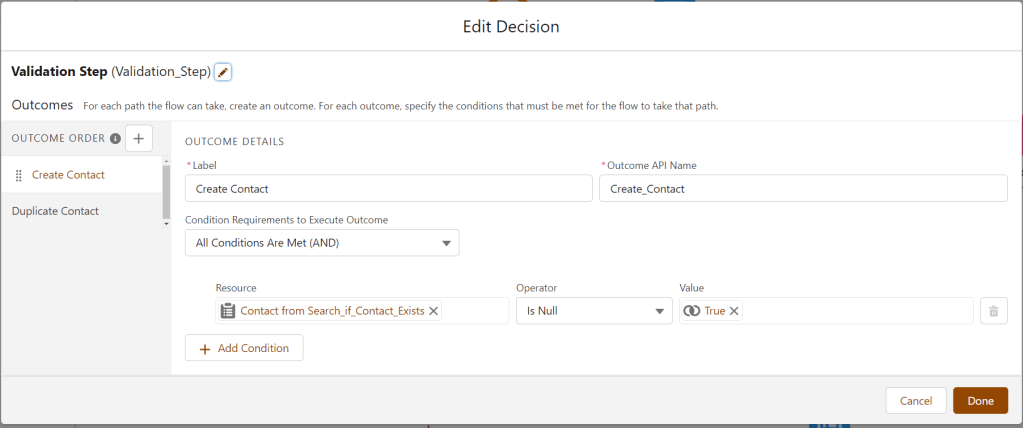
Below, you’ll find the element details that I used in a Flow that creates a Contact with built-in de-dupe screen.
Here, I’m using a Get Records element to find a contact with the same email address that the user entered into the first screen.

Next is a Decision Element to check if a record was found from the Get Records element in the previous step
To show success, warning, and error messages in the lightning style, use the SLDS Scoped Notification blueprint. I found this technique here.

If you found this post helpful or have suggestions or other feedback, please let me know in the comments below!
