

I have a power user in my organization. He understands what his process is, and he is very good about documenting things in salesforce. Other users on the same team as him, do not necessarily have that same confidence, so he will go out of his way to notate things like potential duplicate records or put a link to an existing account on the lead page.

I saw the above example he had written in the notes section of one of his co-worker’s leads. This gave me the idea to make a screen flow to help give a clear visual that would show them existing contacts and matching accounts or if all indications pointed to them needing to create new records instead.
It’s a very simple flow that includes creating 3 new custom fields.
The first field, named ‘Domain’, is a formula field on the account object that will grab just the domain name of the account’s website.
left(
IF(OR(BEGINS(Website, "http://www"),BEGINS(Website, "https://www"), BEGINS(Website, "www.")),
SUBSTITUTE(Website, LEFT(Website, FIND(".", Website)), NULL),
IF(BEGINS(Website, "http://"),
MID(Website, FIND('http://', Website, 1)+7, (LEN(Website) - FIND('http://', Website, 1)+7)),
IF(BEGINS(Website, "https://"),
MID(Website, FIND('https://', Website, 1)+8, (LEN(Website) - FIND('https://', Website, 1)+8)),Website))),FIND('.',
IF(OR(BEGINS(Website, "http://www"),BEGINS(Website, "https://www"), BEGINS(Website, "www.")),
SUBSTITUTE(Website, LEFT(Website, FIND(".", Website)), NULL),
IF(BEGINS(Website, "http://"),
MID(Website, FIND('http://', Website, 1)+7, (LEN(Website) - FIND('http://', Website, 1)+7)),
IF(BEGINS(Website, "https://"),MID(Website, FIND('https://', Website, 1)+8, (LEN(Website) - FIND('https://', Website, 1)+8)),Website
))))-1)
Here’s an example of what the formula does, in the Domain column:

I wanted the screen flow to show hyperlinks to the records it was showing in the tables, and to do this I created 2 formula fields, one on the Account object and one on the Contact object. Both labeled ‘Name’ that I will bring into the data tables to replace the standard Names.
The Account ‘Name’ field, I used the standard account name
The Contact ‘Name’ field, I used a custom formula field already existing that brings the first and the last name together in a concatenation.

HYPERLINK("/" & Id, Name, '_self')HYPERLINK("/" & Id, Full_Name__c , '_self')Creating the Flow……

Create 1 lead record variable named recordId and 1 flow formula resource named leadDomain. For the leadDomain formula:

MID( {!recordId.Email}, FIND("@", {!recordId.Email})+1 , FIND(".", {!recordId.Email}, FIND("@", {!recordId.Email})) - FIND("@", {!recordId.Email})-1 )The leadDomain formula grabs just the domain from the email address on the lead to compare it later with the account’s Domain formula field we created earlier.
Add a Get Records as your first component on the screen flow. Get all Accounts and for the conditions, use the domain formulas and compare them to each other.
I also added an OR for matching by the company name.

Add another Get Records as your 2nd component on the screen flow but get all Contacts this time. For the conditions, use the email addresses from the contact and the lead and compare them to each other.

The 3rd and last component is the Screen element.
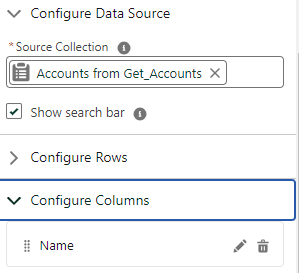
Add 2 Datatables as Inputs.
The first should use the Get Contacts as the source. Configure the columns to include the custom Name field you created to bring in the contacts name as a hyperlink.
The 2nd table should use the Get Accounts components as the source collection. Just as with the Contact datatable, bring custom Name field that was created to show the account name as a hyperlink.



That’s it! throw that baby on the lead’s page layout and voila!


